- Flux
- AI-Toolkit
- Kohya
- LoRA training
Ostris AI-Toolkit vs Kohya_ss for Flux.1-dev LoRA Training: YAML Configs, VRAM & Speed
Ostris AI-Toolkit vs Kohya_ss sd-scripts for Flux.1-dev LoRA training: YAML vs TOML configs, 12GB/16GB/24GB VRAM settings, speed benchmarks, and when to pick.
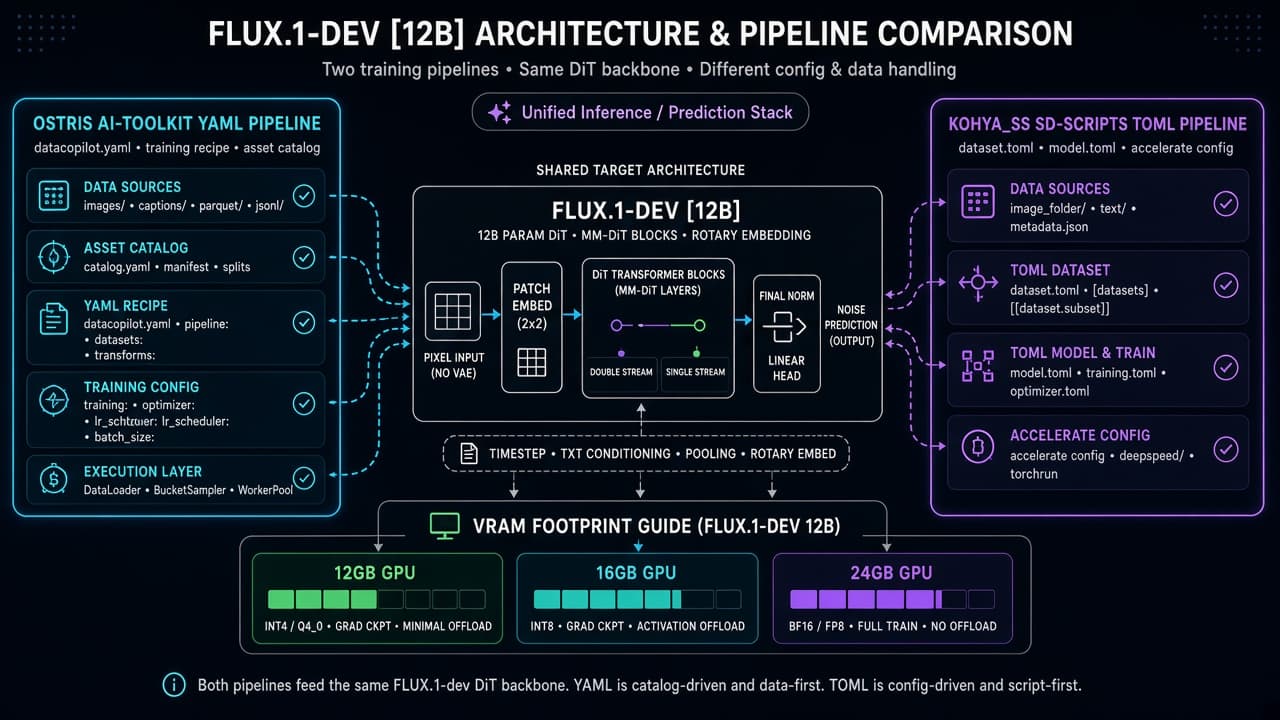
Flux.1-dev LoRA training usually lands on one of two open toolchains: Ostris AI-Toolkit (ostris/ai-toolkit) with a single YAML job file, or Kohya_ss / sd-scripts with TOML datasets plus a long flux_train_network.py CLI. Both feed the same 12B MM-DiT backbone. The choice is about config shape, VRAM tricks, caching, and how much you want to tune per block. This guide compares them side by side, gives working configs, and shows how one LoRA Dataset export trains in either tool.
Ostris AI-Toolkit vs Kohya_ss at a glance
| Factor | Ostris AI-Toolkit | Kohya_ss / sd-scripts |
|---|---|---|
| Configuration format | Single YAML job (pipeline, model, network, train, datasets, sample) | TOML dataset + model/train pieces, plus long CLI flags for flux_train_network.py |
| Flux.1-dev architecture support | Native Flux trainer with MM-DiT / LoRA network type and built-in sample generation | Native via networks.lora_flux, CLIP-L + T5-XXL + AE paths, guidance and flow-shift flags |
| Minimum VRAM floor | About 12–16 GB with quantize: true and low_vram: true (qfloat8-style load) | About 12 GB with --fp8_base plus --blocks_to_swap (for example 18) |
| Latent and T5 caching | On-the-fly by default; optional cached datasets in advanced recipes | Explicit --cache_latents_to_disk and --cache_text_encoder_outputs_to_disk |
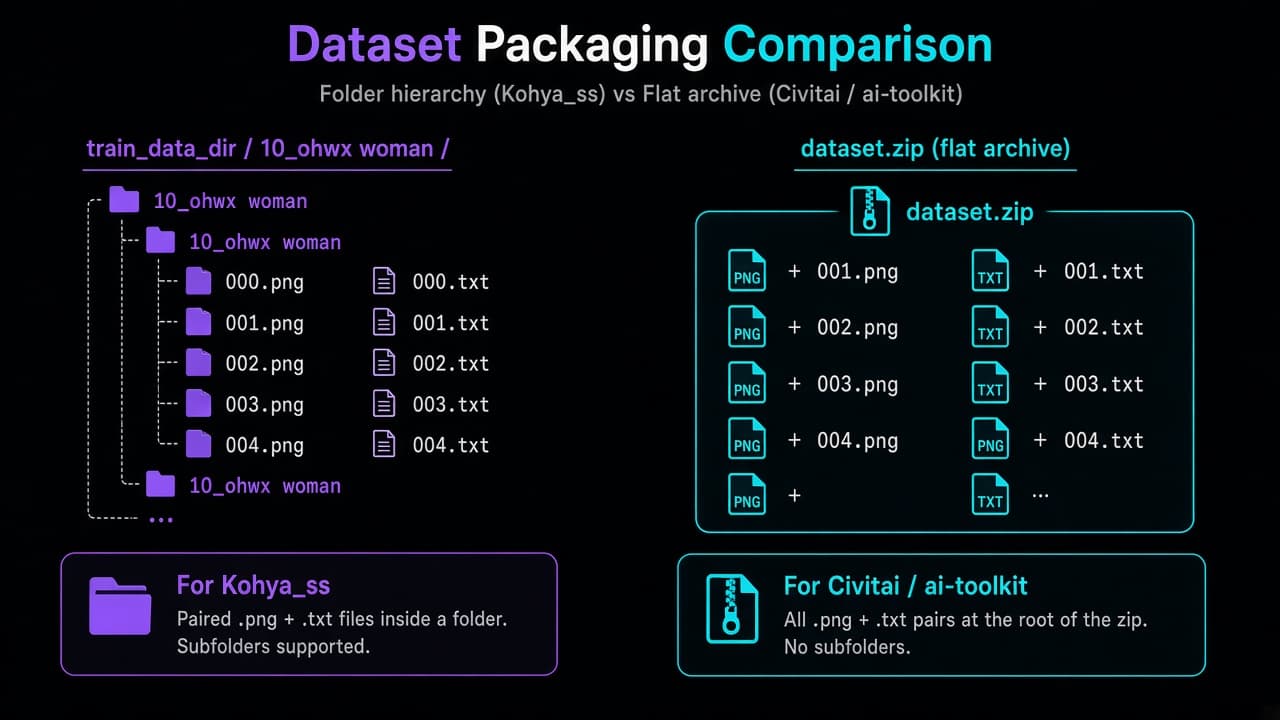
| Folder structure | Flat folder of images with matching .txt captions (folder_path + caption_ext) | Flat TOML [[datasets.subsets]] path, or classic N_trigger class repeats subfolder |
| Optimizer defaults | adamw8bit common; Prodigy also used in community recipes | adamw8bit / prodigy via CLI; fine-grained per-block LR options |
| Best use case | Fast setup, one file to version-control, samples during training on 16–24 GB | 12 GB consumer cards, disk caches for long runs, deep CLI control |
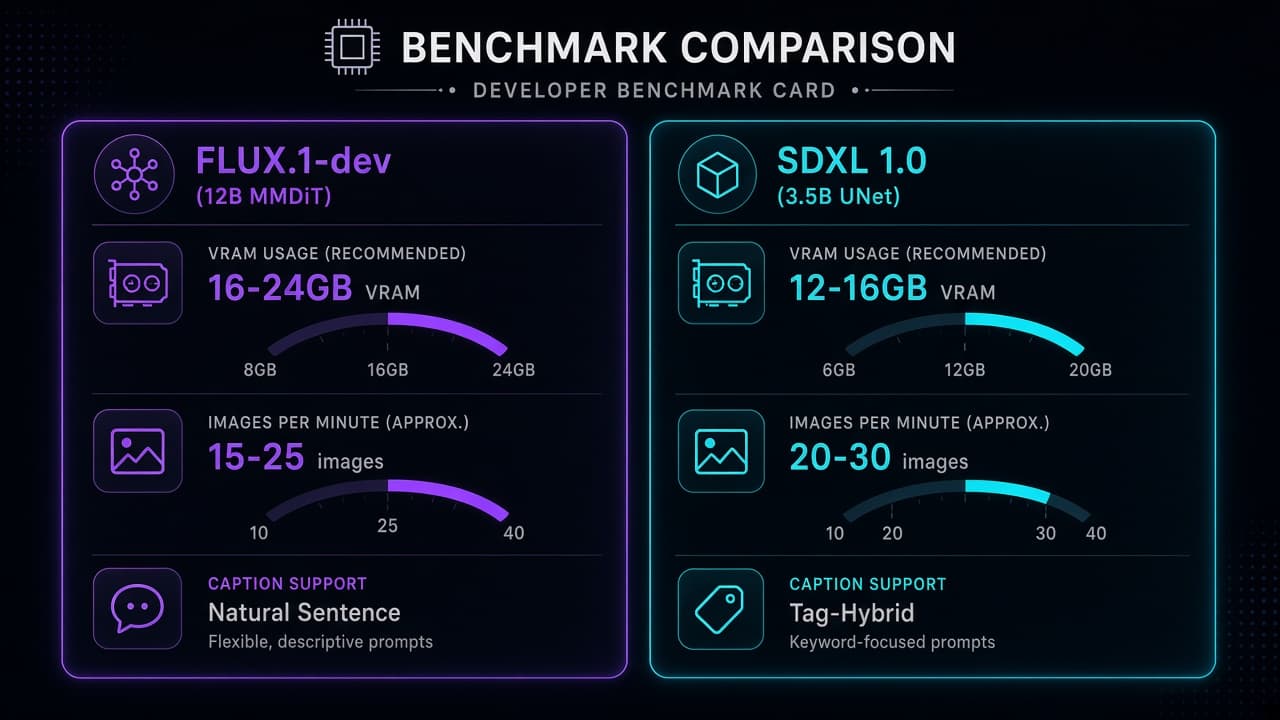
12B
parameters in Flux.1-dev (MM-DiT), the shared backbone both trainers fine-tune with LoRA
Source: Black Forest LabsYAML
single-file recipe in Ostris AI-Toolkit versus TOML + CLI in Kohya sd-scripts
Source: ostris/ai-toolkitVRAM & speed benchmarks: 12 GB vs 16 GB vs 24 GB GPUs
Numbers below are planning ranges for a ~20-image character LoRA at rank 16, batch size 1, about 1,500 steps on Flux.1-dev. Clock times move with driver, resolution buckets, sample frequency, and whether latents/T5 are pre-cached. Treat them as relative guidance, not invoices.
| GPU | Memory mode | Batch | Step speed | ≈1,500 steps wall clock |
|---|---|---|---|---|
| RTX 3060 12 GB | Kohya: --fp8_base + --blocks_to_swap 18 + disk caches; Ostris: quantize + low_vram (tight) | 1 | ≈6–10 sec/it | ≈2.5–4.0 hr (plus first-run cache warm-up on Kohya) |
| RTX 4080 16 GB | Ostris: quantize: true (qfloat8); Kohya: --fp8_base, light or no block swap | 1 | ≈3–5 sec/it | ≈1.25–2.0 hr |
| RTX 3090 / 4090 24 GB | BF16 or FP8 full train; Ostris without aggressive offload; Kohya without blocks_to_swap | 1 (sometimes 2 if VRAM allows) | ≈2–3.5 sec/it (4090 often faster) | ≈50–90 min |
| Cloud A40 / A100 | BF16 preferred; optional FP8 for cost; ample headroom for samples and larger buckets | 1–2 | ≈1.5–3 sec/it class-dependent | ≈40–75 min typical DIY job |
Cache once on Kohya
--cache_latents_to_disk and --cache_text_encoder_outputs_to_disk is slow. Later steps are much faster. Ostris stays simpler: pay a small per-step encode cost unless you add a cached dataset recipe.Working Ostris AI-Toolkit YAML config for Flux.1-dev
AI-Toolkit jobs are usually one YAML file. The snippet below is a minimal Flux.1-dev LoRA recipe: quantized load for consumer VRAM, rank 16, 1,500 steps, multi-resolution buckets, and a trigger word of ohwx.
job: extension
config:
  name: flux_ohwx_lora
  process:
    - type: sd_trainer
      training_folder: output
      device: cuda:0
      trigger_word: ohwx
      network:
        type: lora
        linear: 16
        linear_alpha: 16
      save:
        dtype: float16
        save_every: 250
      datasets:
        - folder_path: /data/ohwx_dataset
          caption_ext: txt
          caption_dropout_rate: 0.05
          shuffle_tokens: false
          cache_latents_to_disk: true
          resolution: [512, 768, 1024]
      train:
        batch_size: 1
        steps: 1500
        gradient_accumulation_steps: 1
        train_unet: true
        train_text_encoder: false
        gradient_checkpointing: true
        noise_scheduler: flowmatch
        optimizer: adamw8bit
        lr: 1e-4
        dtype: bf16
        ema_config:
          use_ema: true
          ema_decay: 0.99
      model:
        name_or_path: black-forest-labs/FLUX.1-dev
        is_flux: true
        quantize: true
        low_vram: true
      sample:
        sampler: flowmatch
        sample_every: 250
        width: 1024
        height: 1024
        prompts:
          - ohwx woman smiling, medium shot, soft daylight
- ohwx man in a coat, three-quarter view, city street- model.name_or_path / quantize / low_vram: loads Flux.1-dev with on-the-fly quantization (commonly discussed as qfloat8-style) so 16 GB cards train without a full bf16 resident copy.
- network.linear / linear_alpha: LoRA rank and alpha; 16 / 16 is a strong Flux character starting point.
- train: batch 1, 1,500 steps,
adamw8bit, bf16 compute, EMA on for smoother late samples. - datasets: flat
folder_pathwith.txtcaptions and resolution buckets including 1024. - trigger_word: rare token such as
ohwx; keep captions trigger-first. See the captioning guide.
Working Kohya_ss (sd-scripts) TOML & CLI config for Flux.1-dev
Kohya splits concerns: a dataset TOML describes folders and repeats; the trainer is invoked with Flux-specific paths and memory flags. GUI users of bmaltais/kohya_ss fill the same fields visually.
# dataset.toml
[[datasets]]
  [[datasets.subsets]]
  image_dir = "/data/ohwx_dataset"
  num_repeats = 10
  caption_extension = ".txt"
  keep_tokens = 1

[general]
shuffle_caption = false
enable_bucket = true
resolution = 1024

# example flux_train_network.py invocation (one line broken for readability)
accelerate launch --mixed_precision bf16 flux_train_network.py \
  --pretrained_model_name_or_path /models/FLUX.1-dev \
  --clip_l /models/clip_l.safetensors \
  --t5xxl /models/t5xxl_fp16.safetensors \
  --ae /models/ae.safetensors \
  --dataset_config /configs/dataset.toml \
  --output_dir /output/flux_ohwx \
  --network_module networks.lora_flux \
  --network_dim 16 \
  --network_alpha 16 \
  --optimizer_type adamw8bit \
  --learning_rate 1e-4 \
  --max_train_steps 1500 \
  --train_batch_size 1 \
  --fp8_base \
  --blocks_to_swap 18 \
  --cache_latents_to_disk \
  --cache_text_encoder_outputs_to_disk \
  --gradient_checkpointing \
  --mixed_precision bf16 \
  --save_every_n_steps 250 \
  --guidance_scale 1.0 \
  --timestep_sampling shift \
  --discrete_flow_shift 3.1582 \
  --model_prediction_type raw \
  --seed 42
Why these Flux flags matter
--guidance_scale 1.0, --timestep_sampling shift, --discrete_flow_shift 3.1582, and --model_prediction_type raw match common community Flux LoRA recipes in kohya-ss/sd-scripts. Wrong prediction type or guidance is a frequent cause of washed-out or non-converging runs. Official scripts and discussions live on kohya-ss/sd-scripts.Dataset folder layout and caption rules for both trainers
A flat export of paired .png (or .jpg) plus same-stem .txt captions works immediately in Ostris via folder_path and in Kohya via a TOML [[datasets.subsets]] image_dir. Classic Kohya DreamBooth folder naming such as 10_ohwx person still applies when you point train_data_dir at a parent and let sd-scripts parse repeats, trigger, and class from the child folder name. Details live in LoRA dataset folder structure for Kohya and Civitai and what ohwx means in Kohya folder names.
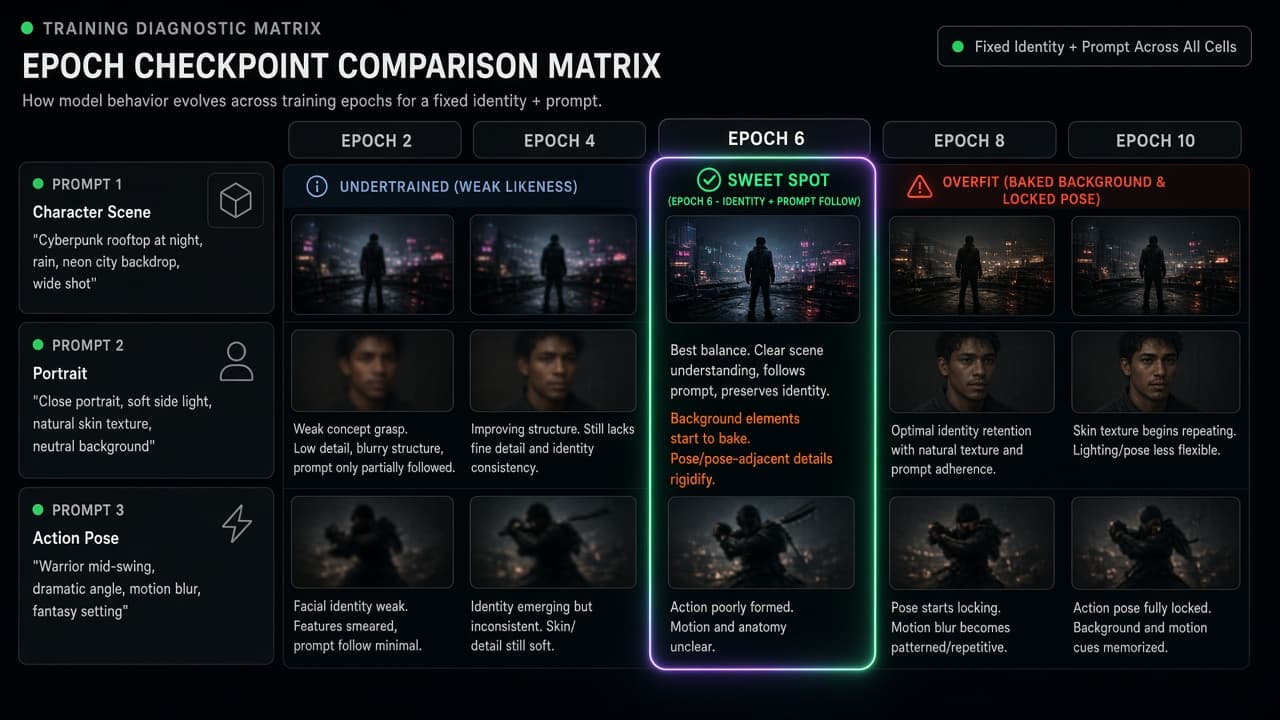
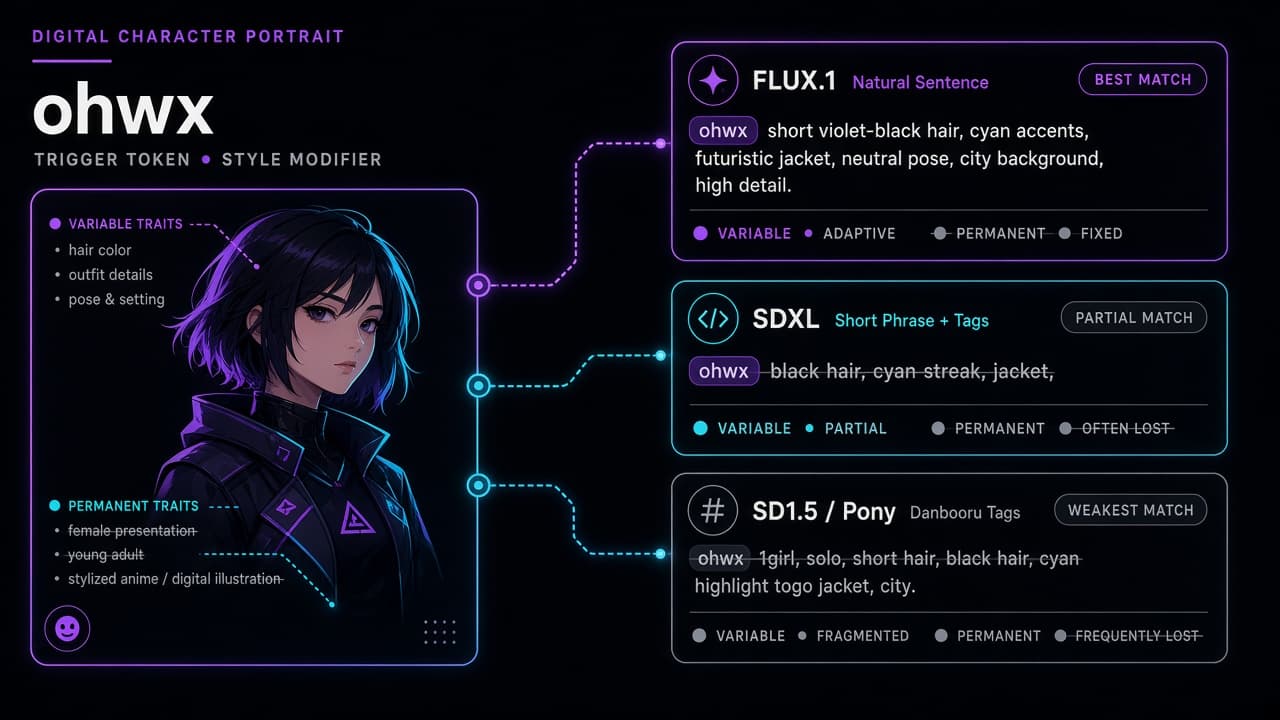
Caption style for Flux should be natural-language sentences with the trigger first. See the trigger words and captions guide. Aim for about 15–25 curated images for a Flux character LoRA (how many images to train a LoRA). Expanding from a single reference is covered in create a LoRA dataset from one image. Stop early if samples go plastic—overfitting vs undertraining. For base-model trade-offs beyond trainers, read Flux vs SDXL LoRA training and the FLUX.1 LoRA dataset requirements guide.
Step-by-step: training your Flux.1-dev LoRA in either tool
- 01
Export a paired Flux-ready dataset
Build 15–25 identity-consistent images at 1024 px. Each image needs a matching.txtcaption that starts with your trigger (for exampleohwx) and describes only what changes: pose, wardrobe, lighting, scene. - 02
Pick Ostris AI-Toolkit or Kohya_ss for your VRAM
On 16–24 GB, Ostris withquantize: trueis usually the fastest path to a working run and mid-training samples. On 12 GB, prefer Kohya with--fp8_base,--blocks_to_swap, and disk caches. - 03
Point the trainer at the correct folder layout
Flat image + caption pairs work for Ostris and Kohya TOML. If you use classic Kohya DreamBooth loading, nest pairs under10_ohwx person(or similar) and pointtrain_data_dirat the parent. - 04
Train about 1,000 to 2,000 steps and sample often
Start at rank 16 / alpha 16, learning rate1e-4, batch size 1. Save samples every ~250 steps. Flux character LoRAs often land between 1,000 and 2,000 steps; more is not always better. - 05
Pick the earliest checkpoint that holds identity
Fix seed and prompt, compare checkpoints, and keep the earliest adapter that holds likeness without locking training pose or background. If later saves look sharper but less flexible, you overtrained.
Which trainer should you choose?
| Your situation | Pick | Why |
|---|---|---|
| 16–24 GB GPU, want one file and built-in samples | Ostris AI-Toolkit | YAML recipe + quantize/low_vram is quick to version and share |
| 12 GB GPU (3060-class) that must train Flux at all | Kohya_ss / sd-scripts | blocks_to_swap + fp8_base + disk caches are the proven floor |
| Long runs where you want latents/T5 cached on disk once | Kohya_ss / sd-scripts | Explicit cache flags make epoch 2+ much cheaper |
| Need per-block learning rates or deep CLI control | Kohya_ss / sd-scripts | Mature flag surface for Flux network training |
| Teaching a teammate or shipping a reproducible starter | Ostris AI-Toolkit | Single YAML is easier to read than a long accelerate command |
| Already live in the kohya_ss GUI | Kohya_ss | Same sd-scripts backend; no need to switch repos |
You do not need two datasets. LoRA Dataset exports paired 1024 px images with trigger-first .txt captions—the layout both Ostris folder_path and Kohya TOML image_dir expect. Train an Ostris run and a Kohya run from the same zip if you want a fair VRAM or quality comparison on your hardware.
Same backbone, different ops
Frequently asked questions
Is Ostris AI-Toolkit better than Kohya for Flux LoRA training?
Neither is universally better. Ostris AI-Toolkit wins on setup speed and a single YAML file with built-in samples, especially on 16 to 24 GB GPUs. Kohya_ss sd-scripts wins when you need 12 GB VRAM via blocks_to_swap, disk caching of latents and T5 outputs, or fine-grained CLI control.
Can I train Flux.1-dev LoRA on a 12 GB GPU?
Yes, most reliably with Kohya using --fp8_base, --blocks_to_swap (for example 18), gradient checkpointing, and latent/text-encoder disk caches. Ostris can approach 12 to 16 GB with quantize: true and low_vram: true, but 12 GB remains tighter there.
Do Ostris and Kohya need different dataset folders?
Not for the common path. A flat folder of image plus matching .txt captions works in Ostris folder_path and in Kohya TOML image_dir. Classic Kohya DreamBooth mode still uses an N_trigger class child folder under train_data_dir.
What LoRA rank should I use for Flux.1-dev characters?
Start at network dim 16 and alpha 16 with learning rate 1e-4 and about 1,000 to 2,000 steps on a 15 to 25 image set. Raise rank only if identity underfits after you confirm captions and trigger usage are correct.
Should I cache latents and T5 embeddings?
On Kohya, yes for long or low-VRAM runs: --cache_latents_to_disk and --cache_text_encoder_outputs_to_disk trade disk for speed after the first pass. Ostris often trains on the fly; enable caching in the YAML dataset block when you retrain the same folder often.
Does LoRA Dataset export work with both trainers?
Yes. Downloads are paired 1024 px images and trigger-first .txt captions. Point Ostris at the folder path or load the same pairs through a Kohya dataset TOML subset without renaming files.