- Learning rate
- LoRA training
- UNet
- Text encoder
- Flux
- SDXL
- Kohya
- AI-Toolkit
LoRA Learning Rate: UNet vs Text Encoder
Start at 1e-4 for the UNet or Flux transformer (AdamW8bit). Text encoder: 5e-5 to 1e-5 on SD1.5/SDXL, or freeze it. How to spot a fried vs underbaked LoRA.
What the Learning Rate Controls in LoRA Training
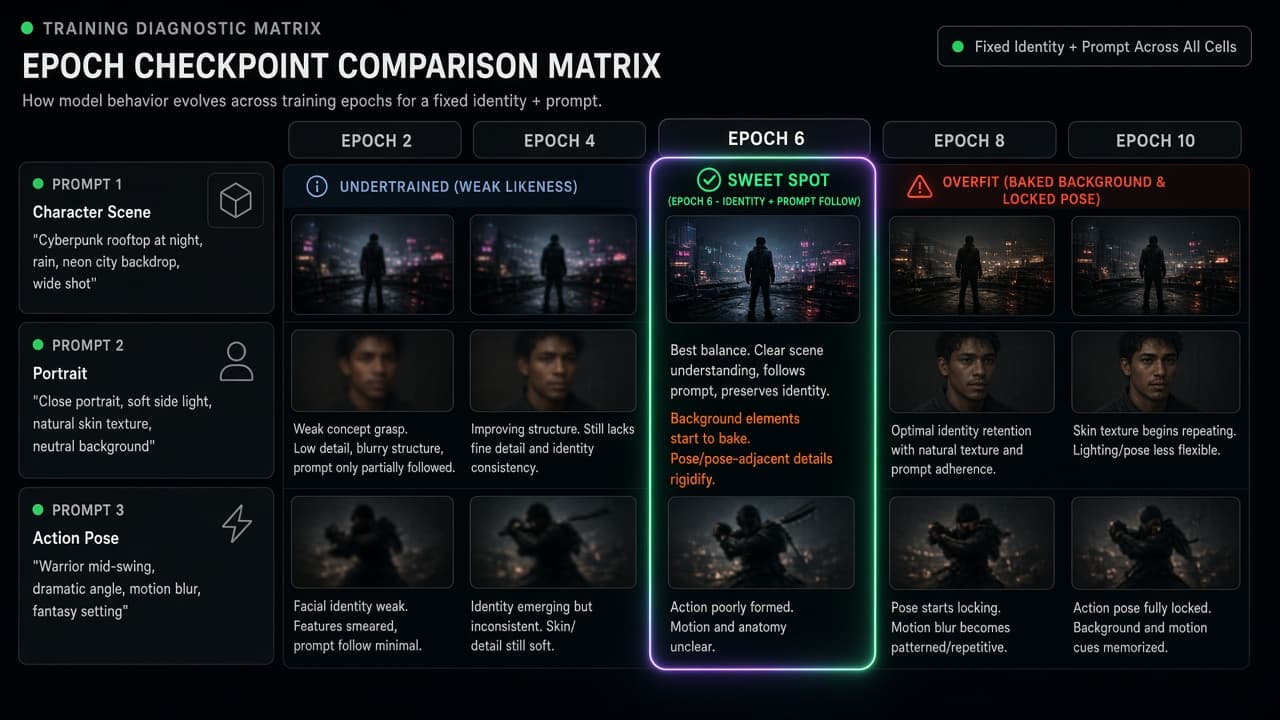
The learning rate sets how far each optimizer step moves the LoRA weights. Too high and the LoRA overshoots: likeness appears fast, then images turn oversaturated, noisy or locked into one pose. Too low and you burn hours of GPU time on a LoRA that barely changes the base model.
A LoRA has two parts that can learn. The UNet, or the transformer in Flux and Wan, holds what images look like. The text encoder, CLIP in SD1.5 and SDXL or CLIP-L plus T5 in Flux, maps words such as your trigger to meaning. Trainers like Kohya sd-scripts let you set them separately with unet_lr and text_encoder_lr, because the text encoder is far more sensitive and breaks prompt following when pushed too hard.
The learning rate never works alone. Total steps, batch size and network alpha all change how strong one rate is in practice, so read this guide alongside how to calculate total training steps and network dim vs alpha.
Starting Learning Rates by Model (AdamW8bit)
These are starting points for a character or style LoRA with AdamW or AdamW8bit, batch size 1 and alpha equal to or half of rank. The Flux, Wan and HunyuanVideo values come from the official trainer example configs listed in the sources; the SD1.5 and SDXL values are the community defaults most Kohya presets ship with.
| Base model | UNet or transformer LR | Text encoder LR | Notes |
|---|---|---|---|
| SD1.5 | 1e-4 | 5e-5 | Text encoder at half the UNet rate is the classic Kohya default |
| SDXL / Pony / Illustrious | 1e-4 | 1e-5 or frozen | Many trainers freeze both text encoders for characters; train them lightly for new concepts |
| Flux.1-dev | 1e-4 | Frozen (not trained) | AI-Toolkit example uses lr 1e-4 with train_text_encoder false; Kohya uses network_train_unet_only |
| Wan 2.1 / HunyuanVideo | 2e-4 | Frozen | Musubi-tuner example commands use adamw8bit at 2e-4 |
| Any model with Prodigy | 1.0 | 1.0 | Prodigy estimates the step size itself; set d_coef to tune strength |
Change one thing at a time
UNet vs Text Encoder: Should You Train the Text Encoder?
Training the text encoder helps the model bind a brand-new trigger word to your subject, which matters most on SD1.5. The cost is prompt bleed: an overtrained text encoder makes unrelated words drift toward your subject, and the LoRA stops combining well with other LoRAs. That is why the text encoder rate is usually half to one tenth of the UNet rate.
On SDXL-family models such as Pony and Illustrious, the two text encoders already know a huge tag vocabulary, so many character LoRAs train the UNet only and still learn the trigger. Turn text encoder training on at a low rate like 1e-5 when the concept has no existing word, such as a made-up creature or a niche art style.
On Flux.1-dev the guidance is clearer. The AI-Toolkit example config sets train_text_encoder false with the comment that it probably will not work with Flux, and the Kohya FLUX docs train the transformer alone unless you remove network_train_unet_only. If you do train CLIP-L or T5 there, text_encoder_lr accepts two values, for example 1e-4 for CLIP-L and 1e-5 for T5. Good captions matter more than text encoder training, so start with our captioning and trigger word guide.
# Kohya sd-scripts, SDXL character LoRA: separate UNet and text encoder rates
--optimizer_type AdamW8bit \
--unet_lr 1e-4 \
--text_encoder_lr 1e-5 \
--lr_scheduler cosine --lr_warmup_steps 100

# Kohya sd-scripts, Flux.1-dev: transformer only, text encoders frozen
--optimizer_type adamw8bit --learning_rate 1e-4 --network_train_unet_only
How to Tell a Fried LoRA from an Underbaked One
Save a checkpoint every few hundred steps and render the same prompt and seed at LoRA weight 1.0 for each one. The symptoms below point to the learning rate rather than the dataset. For a deeper look at the overall pattern, see overfitting vs undertraining.
| Symptom | Likely cause | Fix |
|---|---|---|
| Burned colors, high contrast, noisy texture | UNet rate too high | Halve the rate or pick an earlier checkpoint |
| Every prompt returns the same pose or background | Rate too high or too many steps | Lower the rate and add variety to the dataset |
| Unrelated words pull in your subject | Text encoder rate too high | Lower text_encoder_lr to 1e-5 or freeze it |
| Likeness only at weight 1.3 or higher | Rate too low or too few steps | Raise the rate by 2x or train longer |
| Loss falls, then becomes jagged and climbs | Rate too high for the batch size | Lower the rate or add warmup steps |
Loss is a weak signal
Adjusting the Learning Rate for Batch Size, Alpha and Optimizer
Batch size: a larger batch averages more images per step, so the same rate behaves more gently and runs fewer steps. A common rule of thumb is to raise the rate roughly with the square root of the batch size, for example from 1e-4 at batch 1 to about 2e-4 at batch 4, then confirm with samples.
Network alpha: the LoRA update is scaled by alpha divided by rank. Alpha equal to rank applies the full update, while alpha at half the rank halves it. If you drop alpha from 16 to 1 at rank 16, you need a much higher rate to get the same strength, which is why low-alpha recipes often use 5e-4 or more.
Optimizer and scheduler: AdamW8bit wants the explicit rates above. Prodigy and other adaptive optimizers want 1.0 and adjust on their own, which we compare in Prodigy vs AdamW8bit. Cosine or constant with a short warmup are both fine; warmup mainly protects the first steps from a too-hot start. If you would rather not tune any of this by hand, build a clean, captioned dataset in the LoRA Dataset studio and start from the table above.
Frequently asked questions
What is a good learning rate for a LoRA?
Start at 1e-4 for the UNet or transformer with AdamW8bit and batch size 1. Use 2e-4 for Wan and HunyuanVideo, and 1.0 if you use the Prodigy optimizer.
What is the difference between unet_lr and text_encoder_lr?
unet_lr sets how fast the image-generating network learns, and text_encoder_lr sets how fast the text encoder learns to map your trigger word. The text encoder is more sensitive, so it usually gets half to one tenth of the UNet rate or is frozen.
Should I train the text encoder for a Flux LoRA?
Usually no. Flux.1-dev LoRAs are normally trained on the transformer only, with CLIP-L and T5 frozen. The AI-Toolkit example config disables text encoder training for Flux.
How do I know if my LoRA learning rate is too high?
Samples look burned, oversaturated or noisy, every prompt returns the same pose, or likeness appears very early and then degrades. Halve the rate or use an earlier checkpoint.
Do I need to change the learning rate when I increase batch size?
Usually yes. A larger batch takes fewer, smoother steps, so raise the rate modestly, roughly with the square root of the batch size, and confirm with sample images.
Sources and further reading
- kohya-ss/sd-scripts, FLUX.1 LoRA training documentation (network_train_unet_only, text_encoder_lr)
- ostris/ai-toolkit, train_lora_flux_24gb.yaml example config (lr 1e-4, train_text_encoder false)
- kohya-ss/musubi-tuner, Wan 2.1 training documentation (adamw8bit, learning_rate 2e-4)
- Hugging Face diffusers, DreamBooth LoRA training for SDXL
- Hu et al., LoRA: Low-Rank Adaptation of Large Language Models (alpha scaling)